Voucher Reports are used to display information about voucher usage used to view both future and historical booking data within a selected date range. This report lists all booking details including cancelled bookings.
Creating a Voucher Report
- Select the Reports tab
- Select the Voucher tab
- Select a date range for the report, use custom range to set a start and end date for the report.
- Select an output option, use screen to display on the screen or Excel (CSV Format) to create a file to use in Excel
- Select Search
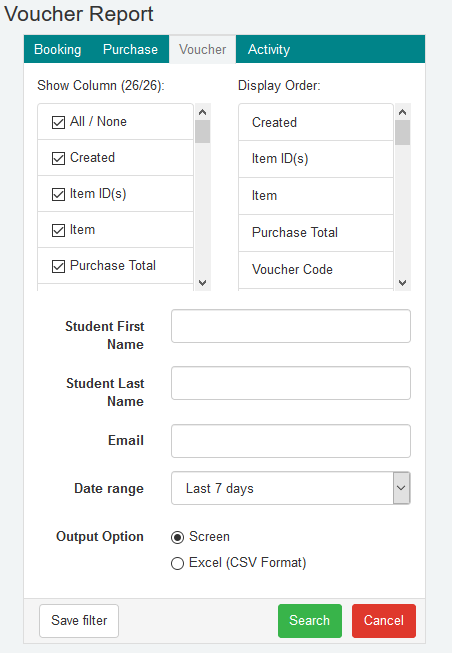
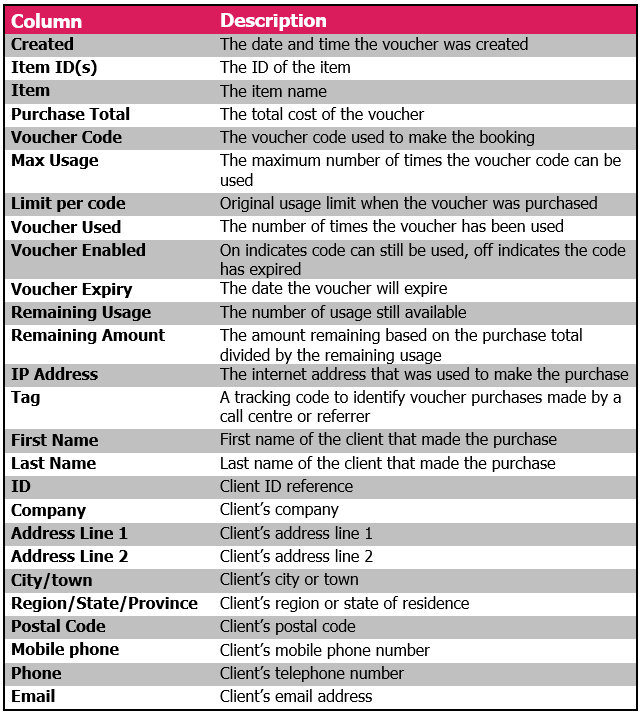
Details for each column available in the voucher report
The table below shows all the data fields that can be used in compiling Voucher reports.
Was this article helpful?
That’s Great!
Thank you for your feedback
Sorry! We couldn't be helpful
Thank you for your feedback
Feedback sent
We appreciate your effort and will try to fix the article