The Reseller portal can be used to create a Fee report based on a date range and caters for Fee Report for accounts that have payments processed by the NRMA SecurePay gateway and accounts that use the bookitlive payment gateway.
Creating a Consolidated Fee Report for accounts using the NRMA SecurePay Gateway
- Logon to bookitlive using your Reseller/Admin account
- Select the Reports tab
- Select the Fee tab
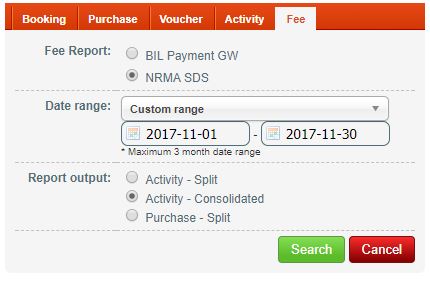
- Select NRMA SDS for the Fee Report
- Select Custom Range for the date range
- For a weekly report enter the start date as the last Wednesday and end date as this Wednesday
- For a Monthly report enter the start date as the first day of the month and end date as the last day of the month
- Select Activity - Consolidated for the Report Output
- Select Search
Was this article helpful?
That’s Great!
Thank you for your feedback
Sorry! We couldn't be helpful
Thank you for your feedback
Feedback sent
We appreciate your effort and will try to fix the article