Weekly files (bookitlive.net)
- Log into https://bookitlive.net with your reseller user account
- Select the reports tab
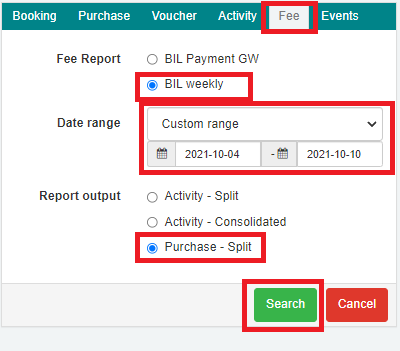
- Select the Fees tab
- Select the BIL weekly fee report
- Select Custom range for the date range
- Select the week start (Monday) to end date (Sunday) Note: it is important that the date range is correct as setting a range that is longer than 3 months can impact server performance for all bookitLive users
- Select Purchase - Split for the report output
- Select Search Note: This should take around 5-10 seconds to process, on completion the file is downloaded
Monthly files (bookitlive.net)
- Log into https://bookitlive.net with your reseller user account
- Select the reports tab
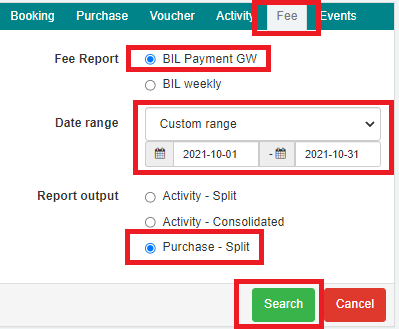
- Select the Fees tab
- Select the BIL Payment GW fee report
- Select Custom range for the date range
- Select the month start (1st day of the month) to end date (last day of the month) Note: it is important that the date range is correct as setting a range that is longer than 3 months can impact server performance for all bookitLive users
- Select Purchase - Split for the report output
- Select Search Note: This should take around 20-30 seconds to process, on completion the file is downloaded
Monthly files (nrma.bookitlive.net)
- Log into https://nrma.bookitlive.net with your reseller user account
- Select the reports tab
- Select the Fees tab
- Select the BIL Payment GW fee report
- Select Custom range for the date range
- Select the month start (1st day of the month) to end date (last day of the month) Note: it is important that the date range is correct as setting a range that is longer than 3 months can impact server performance for all bookitLive users
- Select Purchase - Split for the report output
- Select Search Note: This should take around 20-30 seconds to process, on completion the file is downloaded
Was this article helpful?
That’s Great!
Thank you for your feedback
Sorry! We couldn't be helpful
Thank you for your feedback
Feedback sent
We appreciate your effort and will try to fix the article