Fixture upload template for project installation.
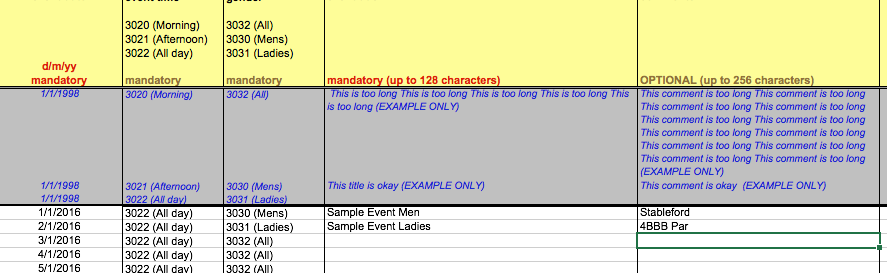
Complete the spreadsheet with as much data as required, can be done monthly, quarterly or yearly.
- Upload of the spreadsheet will add events, not replace or edit current events.
- Avoid using commas or apostrophes in Title and Description fields
| Column A - Date | Column B - Time of Day | Column C - Gender | Column D - Title | Column E - Description |
| Day of Week in dd/mm/yyyy format ie 01/01/2017 Events will not load with day of week in field ie Tue 1/1/2017 | Morning or Afternoon or All day or Twilight or Evening | Mens or Ladies or All | Short explanation of the event up to 128 characters Full event title will not load with comma in Title | Expanded explanation of the event up to 256 characters Full event description will not load with comma in description |
Was this article helpful?
That’s Great!
Thank you for your feedback
Sorry! We couldn't be helpful
Thank you for your feedback
Feedback sent
We appreciate your effort and will try to fix the article