Accounts using bookitPay or SecurePay can be configured to cater for manual and automatic refunding.
- Login as an Administrator or Manager
- Select Settings > Online Payments
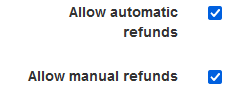
- Select Allow automatic refunds to allow automatic refunding when a booking is cancelled
- Select Allow manual refunds to enable the ability to manually refund a transaction
- Select Save
Was this article helpful?
That’s Great!
Thank you for your feedback
Sorry! We couldn't be helpful
Thank you for your feedback
Feedback sent
We appreciate your effort and will try to fix the article